
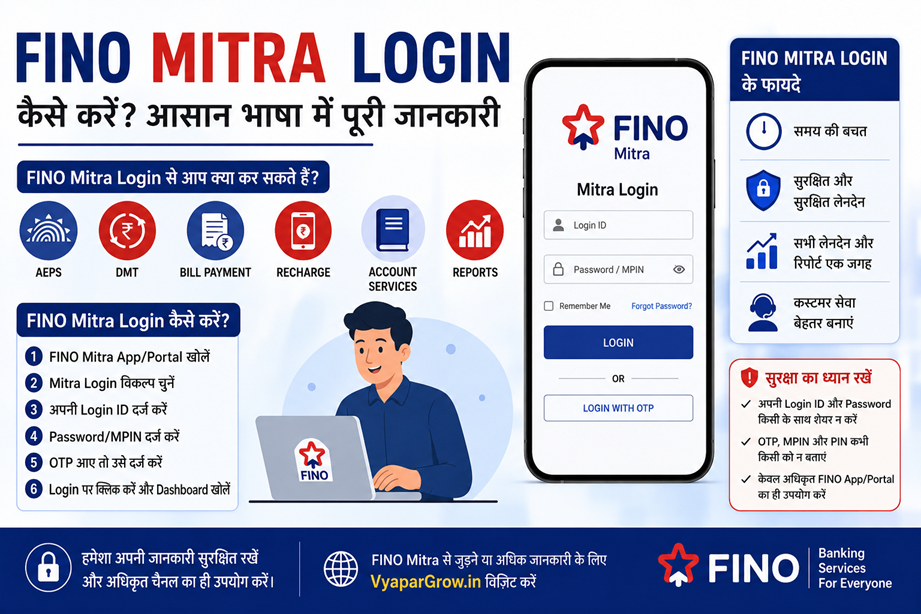
FINO Mitra Login – FINO Mitra Login कैसे करें, ID, Password और Login Problems की पूरी जानकारी
अगर आप FINO Mitra के रूप में banking या financial services से जुड़े हैं, तो FINO Mitra Login आपके daily work का एक important हिस्सा हो सकता है। Login के जरिए आपके current FINO platform और assigned services के अनुसार transaction, merchant profile, reports और अन्य सुविधाओं तक access मिल सकता है।
कई नए FINO Mitra users के मन में कुछ common questions होते हैं:
- FINO Mitra Login कैसे करें?
- FINO Mitra Login ID कहाँ मिलेगी?
- Password कैसे मिलेगा?
- FINO Mitra Login नहीं हो रहा तो क्या करें?
- FINO Mitra ID और Login ID में क्या अंतर है?
- Password भूलने पर क्या करें?
- Mobile से FINO Mitra Login किया जा सकता है?
इस guide में इन्हीं सवालों को आसान भाषा में समझते हैं।
FINO Mitra क्या है?
FINO Mitra नाम FINO के banking/financial service ecosystem में इस्तेमाल होने वाली terminology के रूप में देखा जा सकता है। Mitra के जरिए उपलब्ध services आपके current onboarding, platform और authorization पर depend करती हैं।
Simple flow को इस तरह समझ सकते हैं:
FINO Mitra Registration / Onboarding
↓
Verification & Activation
↓
FINO Mitra Login Access
↓
Available Services
↓
Customer Transactions / Banking Work
हर Mitra को एक जैसी services या access automatically मिले, यह जरूरी नहीं है।
FINO Mitra Login क्या है?
FINO Mitra Login authorized FINO platform, application या portal में अपने Mitra account से sign in करने की प्रक्रिया है।
Login करने के बाद available dashboard में आपके account के अनुसार अलग-अलग options दिखाई दे सकते हैं।
इनमें applicable setup के अनुसार:
- Customer services
- Transactions
- Transaction history
- Reports
- Merchant/Mitra profile
- Settlement-related information
- Service status
जैसे options शामिल हो सकते हैं।
FINO Mitra Login के लिए क्या चाहिए?
Login process current platform पर depend कर सकता है। सामान्य रूप से आपको कुछ authentication details की जरूरत हो सकती है।
| Requirement | काम |
|---|---|
| Mitra/Login ID | Account identification |
| Password/MPIN | Authentication |
| Registered Mobile | OTP/verification, जहाँ लागू हो |
| Smartphone/Laptop | Platform access |
| Internet | Online connection |
| FINO App/Portal | Login और services |
Exact login credentials और process आपके current FINO setup के अनुसार अलग हो सकते हैं।
FINO Mitra Login कैसे करें?
Step 1: Authorized FINO Platform खोलें
FINO Mitra के लिए इस्तेमाल किए जा रहे authorized app या portal को open करें।
Random Google results, unknown websites या WhatsApp पर मिले suspicious links से login करने से बचें।
Step 2: Mitra Login Option चुनें
अगर platform पर अलग-अलग login options हैं, तो applicable Mitra Login option select करें।
Step 3: Login ID Enter करें
अपनी registered Mitra/Login ID enter करें।
Step 4: Password या Authentication Detail डालें
System द्वारा मांगी गई password, MPIN या अन्य authentication detail enter करें।
Step 5: OTP Verification
अगर current login process में OTP required है, तो registered mobile पर प्राप्त OTP enter करें।
Step 6: Dashboard Open करें
Details successfully verify होने पर आपका available Mitra dashboard open हो सकता है।
Note: Login page, URL, app name और authentication process समय के साथ बदल सकते हैं। हमेशा current authorized FINO instructions को follow करें।
FINO Mitra Login ID कहाँ मिलेगी?
अगर आपको अपनी Mitra Login ID नहीं पता है, तो इन जगहों पर check करें:
1. Registration/Onboarding SMS
FINO से registration या activation के समय मिले SMS को देखें।
2. Email
अगर onboarding में email address दिया गया था, तो FINO-related emails check करें।
3. FINO App/Portal
अगर आपको पहले से access है, तो profile या account details section check करें।
4. Registration Records
आपके पास मौजूद onboarding documents या communication में Mitra-related information हो सकती है।
5. Authorized Support
अगर ID नहीं मिल रही है, तो verification के बाद authorized FINO support/channel से सहायता लें।
FINO Mitra Password भूल गए तो क्या करें?
Password याद नहीं है तो अनुमान लगाकर बार-बार login करने से बचें।
सबसे पहले login page पर:
Forgot Password / Reset Password
जैसा option उपलब्ध है या नहीं, यह check करें।
अगर self-service reset उपलब्ध है, तो system के instructions follow करें।
OTP या verification की जरूरत पड़ सकती है।
अगर reset option काम नहीं कर रहा है, तो authorized FINO support से संपर्क करें।
FINO Mitra Login नहीं हो रहा है – क्या करें?
Login problem कई कारणों से हो सकती है।
1. Internet Check करें
Slow या unstable internet connection होने पर login fail हो सकता है।
2. Login ID Check करें
Typing mistake या extra space भी error का कारण बन सकता है।
3. Password Check करें
Caps Lock और password spelling carefully check करें।
4. App Update करें
अगर mobile application इस्तेमाल कर रहे हैं, तो current supported version उपलब्ध है या नहीं, check करें।
5. Browser Check करें
Web-based portal में browser session/cache issue हो सकता है।
Browser को restart करके फिर कोशिश करें।
6. Account Status Check करें
अगर सही credentials के बाद भी login नहीं हो रहा, तो account activation या status issue हो सकता है।
7. Support से Contact करें
बार-बार unsuccessful attempts करने के बजाय authorized FINO support/channel से समस्या verify कराएं।
“Invalid User ID or Password” Error
अगर ऐसा error दिखाई देता है, तो:
- Login ID दोबारा check करें
- Password verify करें
- Caps Lock check करें
- Saved password की जगह manually verify करें
- Forgot Password option देखें
अगर समस्या बनी रहती है, तो official recovery/support process follow करें।
FINO Mitra Login में OTP नहीं आ रहा
OTP-based login में कभी-कभी network या SMS delivery delay हो सकता है।
इन चीजों को check करें:
- Registered mobile number
- Mobile network
- SMS inbox
- Phone storage
- SMS blocking settings
- Temporary network issue
कुछ समय बाद retry करें।
Repeated OTP failure होने पर authorized support से संपर्क करें।
FINO Mitra Account Locked हो गया
अगर login करते समय Account Locked, Blocked या similar message दिखाई देता है, तो लगातार login attempts न करें।
संभव कारणों में:
- Multiple incorrect login attempts
- Security restriction
- Password issue
- Account status
- Technical problem
शामिल हो सकते हैं।
Exact reason आपके current platform पर depend करेगा।
Mobile से FINO Mitra Login
अगर आपके current FINO Mitra setup में mobile access available है, तो smartphone से login किया जा सकता है।
आपको सामान्यतः चाहिए:
Smartphone
Internet
Authorized FINO App/Portal
Valid Login Credentials
Mobile से banking-related login करते समय trusted internet connection इस्तेमाल करना बेहतर है।
Laptop/Desktop से FINO Mitra Login
अगर आपका current Mitra platform web access support करता है, तो laptop या desktop से login करना convenient हो सकता है।
यह खासकर तब useful है जब आप:
- Reports देखते हैं
- Transaction details manage करते हैं
- Documents handle करते हैं
- Printing करते हैं
- Customer records maintain करते हैं
FINO Mitra Login और FINO Merchant Login में Difference
दोनों terms similar लग सकती हैं, लेकिन इन्हें automatically same नहीं मानना चाहिए।
| FINO Mitra Login | FINO Merchant Login |
|---|---|
| Mitra-specific access | Merchant-specific access |
| Current Mitra platform पर depend | Merchant platform पर depend |
| Assigned services के अनुसार access | Merchant services के अनुसार access |
| Login details अलग हो सकती हैं | Login details अलग हो सकती हैं |
आपका actual role और onboarding platform यह तय करेगा कि आपको कौन-सा login use करना है।
FINO Mitra ID और Login ID में Difference
Mitra ID account identification से संबंधित detail हो सकती है।
Login ID platform में sign-in करने के लिए इस्तेमाल की जाने वाली identification हो सकती है।
दोनों हमेशा identical हों, यह जरूरी नहीं है।
इसलिए किसी दूसरे Mitra की जानकारी देखकर अपने account की Login ID assume न करें।
FINO Mitra Login के बाद क्या-क्या Services मिल सकती हैं?
यह आपके current account और activated services पर depend करेगा।
Applicable setup में services जैसे:
- AePS
- Micro ATM
- Money Transfer
- Bill Payment
- Recharge
- Account-related services
- Transaction reporting
- Other financial services
उपलब्ध हो सकती हैं।
हर FINO Mitra को सभी services automatically available हों, यह जरूरी नहीं है।
FINO Mitra Login से Transaction कैसे Check करें?
अगर आपके current dashboard में transaction history/reporting option available है, तो वहां से applicable transaction details देखी जा सकती हैं।
Useful information में शामिल हो सकती हैं:
- Transaction date
- Transaction type
- Amount
- Status
- Reference/Transaction number
अगर कोई transaction pending या failed है, तो उसका reference number संभालकर रखें।
FINO Mitra Login में Security कैसे रखें?
Banking-related account होने के कारण security को seriously लेना चाहिए।
कभी भी share न करें:
❌ OTP
❌ Password
❌ MPIN
❌ PIN
❌ Authentication code
इन बातों का ध्यान रखें:
- Unknown login links पर click न करें
- Public computer पर credentials save न करें
- Suspicious calls पर information न दें
- Screen-sharing/remote-access request को blindly accept न करें
- Merchant/Mitra account details public groups में post न करें
क्या FINO Mitra Login Link Google से Search करना Safe है?
Google पर search करने से कई results दिखाई दे सकते हैं।
हर result official नहीं हो सकता।
इसलिए किसी random website पर:
Login ID + Password + OTP
enter करने से बचें।
हमेशा authorized FINO source/app/platform का उपयोग करें।
FINO Mitra Login में Common Problems
| Problem | क्या करें |
|---|---|
| Login ID नहीं पता | SMS, email और onboarding records check करें |
| Password भूल गए | Forgot Password option check करें |
| OTP नहीं आया | Mobile network और registered number check करें |
| Invalid credentials | ID/password दोबारा verify करें |
| Account locked | Repeated attempts रोकें और support लें |
| App काम नहीं कर रही | App update और internet check करें |
| Portal open नहीं हो रहा | Browser/network check करें |
| Transaction नहीं दिख रहा | Reference details के साथ support से संपर्क करें |
FINO Mitra Login के लिए Best Practices
एक अच्छा Mitra केवल login करना नहीं सीखता। Account को properly manage करना भी जरूरी है।
Daily Routine
Business शुरू करने से पहले
→ Internet check करें
→ App/portal access check करें
→ Required device check करें
Transaction के दौरान
→ Customer details carefully verify करें
→ Transaction status check करें
→ Reference number संभालकर रखें
Business के बाद
→ Transaction report check करें
→ Cash reconciliation करें, जहाँ applicable हो
→ Settlement information review करें, जहाँ available हो
इस तरह छोटी mistakes को जल्दी identify किया जा सकता है।
FINO Mitra Login के लिए कौन-कौन से Tools Useful हैं?
आपकी services के अनुसार अलग-अलग tools की जरूरत हो सकती है।
| Tool | Use |
|---|---|
| Smartphone | Mobile-based services |
| Laptop/Desktop | Portal, reports और documents |
| Internet | Online transactions |
| Biometric Device | AePS, जहाँ applicable हो |
| Micro ATM | Card-based services, जहाँ applicable हो |
| Thermal Printer | Receipt printing |
| Passbook Printer | Passbook service, जहाँ applicable हो |
| CCTV | Shop security |
| UPS/Inverter | Power backup |
हर Mitra को सभी equipment खरीदना जरूरी नहीं है।
FINO Mitra Registration के बाद Login कब मिलेगा?
यह आपके onboarding और activation process पर depend करता है।
सामान्य flow:
Application
↓
Verification
↓
Onboarding
↓
Activation
↓
Login Access
इसलिए registration complete होने के तुरंत बाद login उपलब्ध हो, यह हर case में जरूरी नहीं है।
अगर काफी समय बाद भी access नहीं मिला है, तो authorized onboarding/support channel से status check करें।
FINO Mitra Login के लिए VyaparGrow
अगर आप FINO Mitra, FINO Merchant या FINO CSP से जुड़ना चाहते हैं, तो registration से पहले eligibility, documents, services और onboarding process समझना useful रहेगा।
FINO-related information के लिए VyaparGrow देखें:
VyaparGrow.in – FINO Merchant & CSP Information
FINO CSP Registration – VyaparGrow
VyaparGrow पर FINO से संबंधित topics जैसे:
- FINO Merchant Registration
- FINO CSP Registration
- FINO Merchant Login
- FINO Merchant ID
- FINO Merchant Eligibility
- FINO Merchant Documents
- FINO Merchant Services
- FINO Merchant Commission
- FINO CSP Tools
की जानकारी भी देख सकते हैं।
FINO Mitra Login – FAQs
1. FINO Mitra Login क्या है?
यह authorized FINO platform या application में Mitra account access करने की प्रक्रिया है।
2. FINO Mitra Login के लिए क्या चाहिए?
Current platform के अनुसार Login ID, password/MPIN और कभी-कभी OTP जैसी authentication details की जरूरत हो सकती है।
3. FINO Mitra Login ID कहाँ मिलेगी?
Registration/onboarding communication, applicable app/portal या authorized support channel में जानकारी मिल सकती है।
4. FINO Mitra Password भूल गए तो क्या करें?
Login page पर Forgot Password/Reset option देखें। उपलब्ध न होने पर authorized support से संपर्क करें।
5. FINO Mitra Login नहीं हो रहा है तो क्या करें?
Internet, Login ID, password, OTP, app/browser और account status check करें। फिर भी समस्या हो तो authorized support से संपर्क करें।
6. क्या mobile से FINO Mitra Login किया जा सकता है?
अगर आपके current FINO setup में mobile access available है, तो smartphone से login किया जा सकता है।
7. क्या FINO Mitra और FINO Merchant Login same है?
जरूरी नहीं। दोनों अलग roles/platforms से जुड़े हो सकते हैं।
8. क्या सभी FINO services Mitra Login में मिलती हैं?
नहीं। Services आपके account, role, activation और current FINO platform पर depend करती हैं।
9. OTP किसी FINO agent को बता सकते हैं?
नहीं। OTP, password और MPIN जैसी confidential information share नहीं करनी चाहिए।
10. FINO Mitra Login के लिए laptop जरूरी है?
हर situation में नहीं। अगर current platform mobile access support करता है, तो smartphone sufficient हो सकता है। Web-based services और reports के लिए laptop useful हो सकता है।
निष्कर्ष
FINO Mitra Login आपके Mitra account से जुड़ी banking और financial services को access करने का important तरीका हो सकता है। Login process आपके current FINO platform, role और activated services के अनुसार अलग हो सकता है।
अगर login नहीं हो रहा है, तो सबसे पहले:
Internet → Login ID → Password → OTP → App/Browser → Account Status
check करें।
अपनी Login ID, Password, OTP और MPIN को सुरक्षित रखें और केवल authorized FINO platform का इस्तेमाल करें।
अगर आप FINO Mitra/FINO Merchant/CSP शुरू करने की तैयारी कर रहे हैं, तो registration से पहले eligibility, documents, services और required equipment की जानकारी जरूर समझें।